Case study: Skydance Multiview
Skydance

A Multiview for every event, from one deployment

Skydance, formerly Warner Bros. Discovery, needed Multiview outputs for live events across a wide range of sports. Mobii delivered them with Studio on the deployment already running in Skydance’s cloud for the NASCAR In-Car Driver Feeds.

10+Competitions covered with Multiview outputs
6Sports, from basketball to motorsport
1Operator monitoring and controlling the workflow
1Deployment, shared with the NASCAR In-Car Driver Feeds
Multiview, Skydance deployment
Built from a Studio template
On air
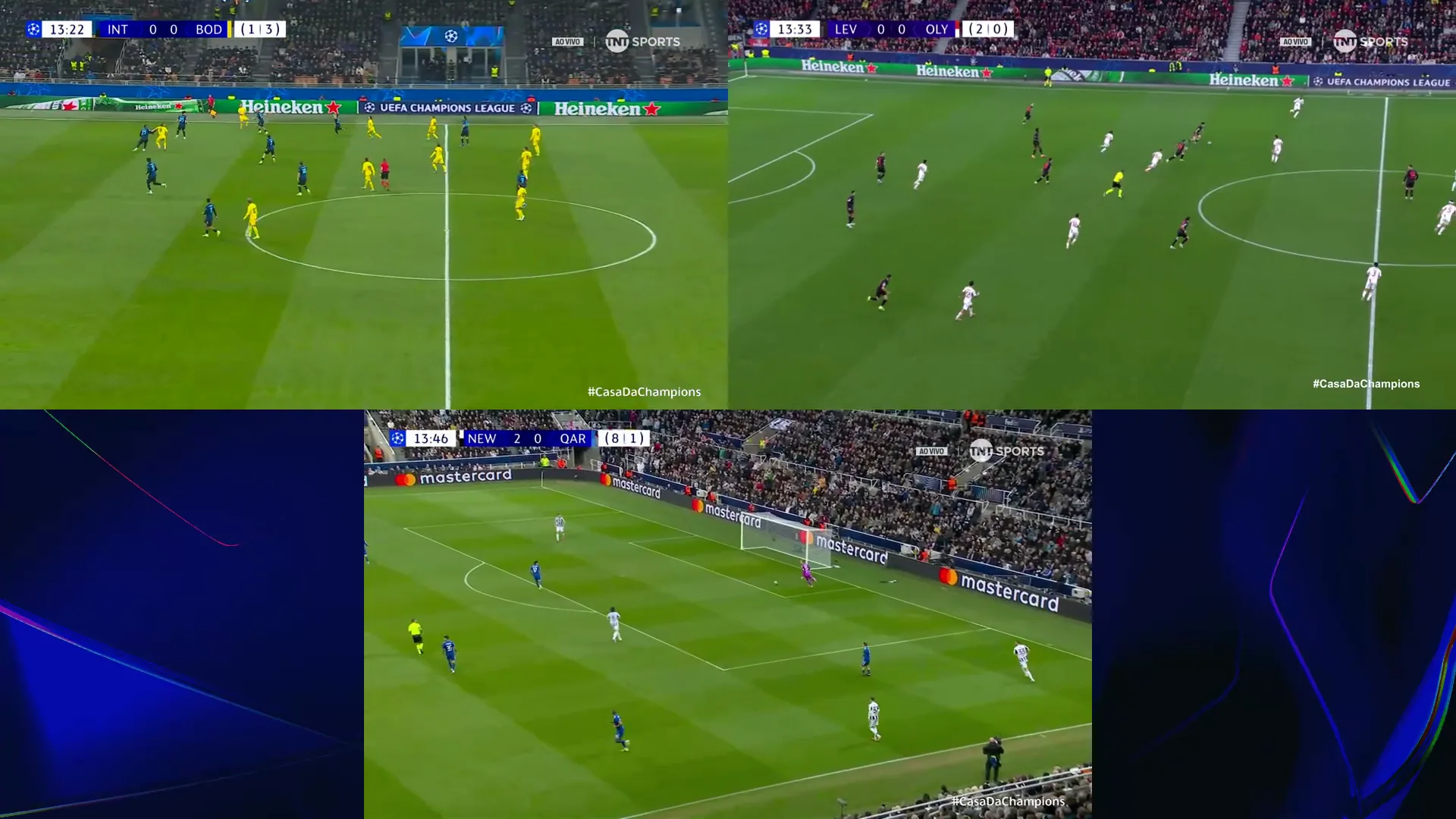
A three box Multiview of UEFA Champions League matches, built from a Studio template on the Skydance deployment
6Sports
10+Competitions
1Operator
Customer
Skydance (formerly Warner Bros. Discovery)
Events
Basketball, tennis, soccer, ice hockey, rugby and motorsport
Products
Prism, Fusion and Studio
Deployment
Skydance’s AWS environment, alongside the NASCAR workflow
How it works

Skydance chooses the sources, Studio builds the Multiview

Fusion prepares every incoming feed, Studio applies the template, layout, slates and styling for each event, and logic in the workflow automates source switching and slates where needed.

01 Prepare

Any source, one format

Source feeds arrive as SRT, at times with different parameters. Fusion brings every one of them into a common format for processing.

02 Build

A template for each event

Studio sets the layout, decides which source fills each position, and applies the slates and design styling for that event.

03 Run

Logic, with an operator in control

Workflow logic switches sources and brings in slates where needed, and a single operator monitors and controls the output.

Events covered

Six sports, one workflow

Each event gets its own template, layout and styling, while the underlying workflow stays the same. Multiview has also supported further events beyond those listed.

Basketball

March Madness

Tennis

Roland Garros

Soccer

FA Cup, Premier League, Champions League, Europa League and Paulistão

Ice hockey

NHL

Rugby

UK Premiership Rugby

Motorsport

24 Hours of Le Mans

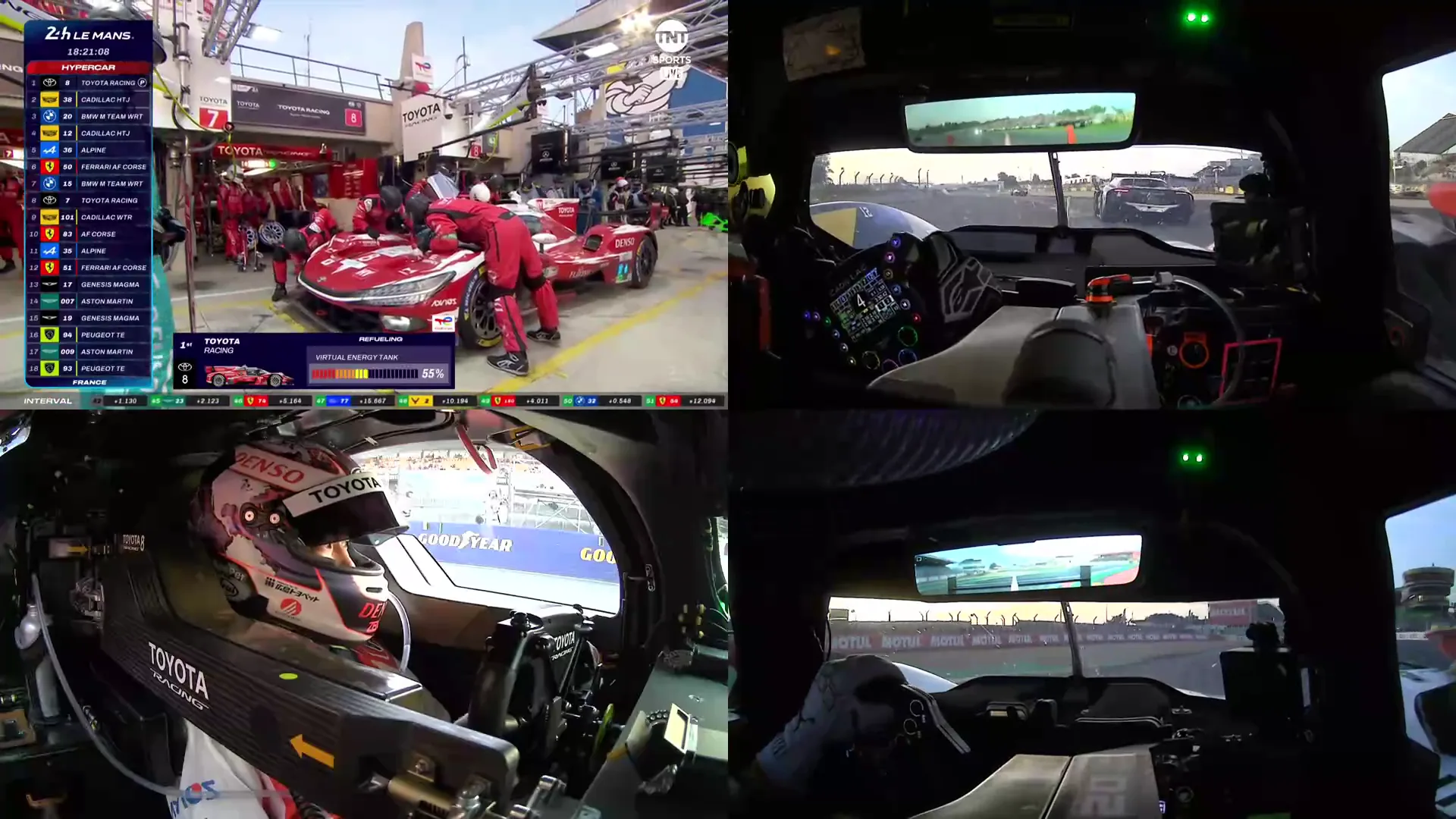
A four box Multiview of the 24 Hours of Le Mans, with the pit lane, onboard cameras and the timing tower
24 Hours of Le MansFour box with the timing tower alongside the pit lane and onboard cameras
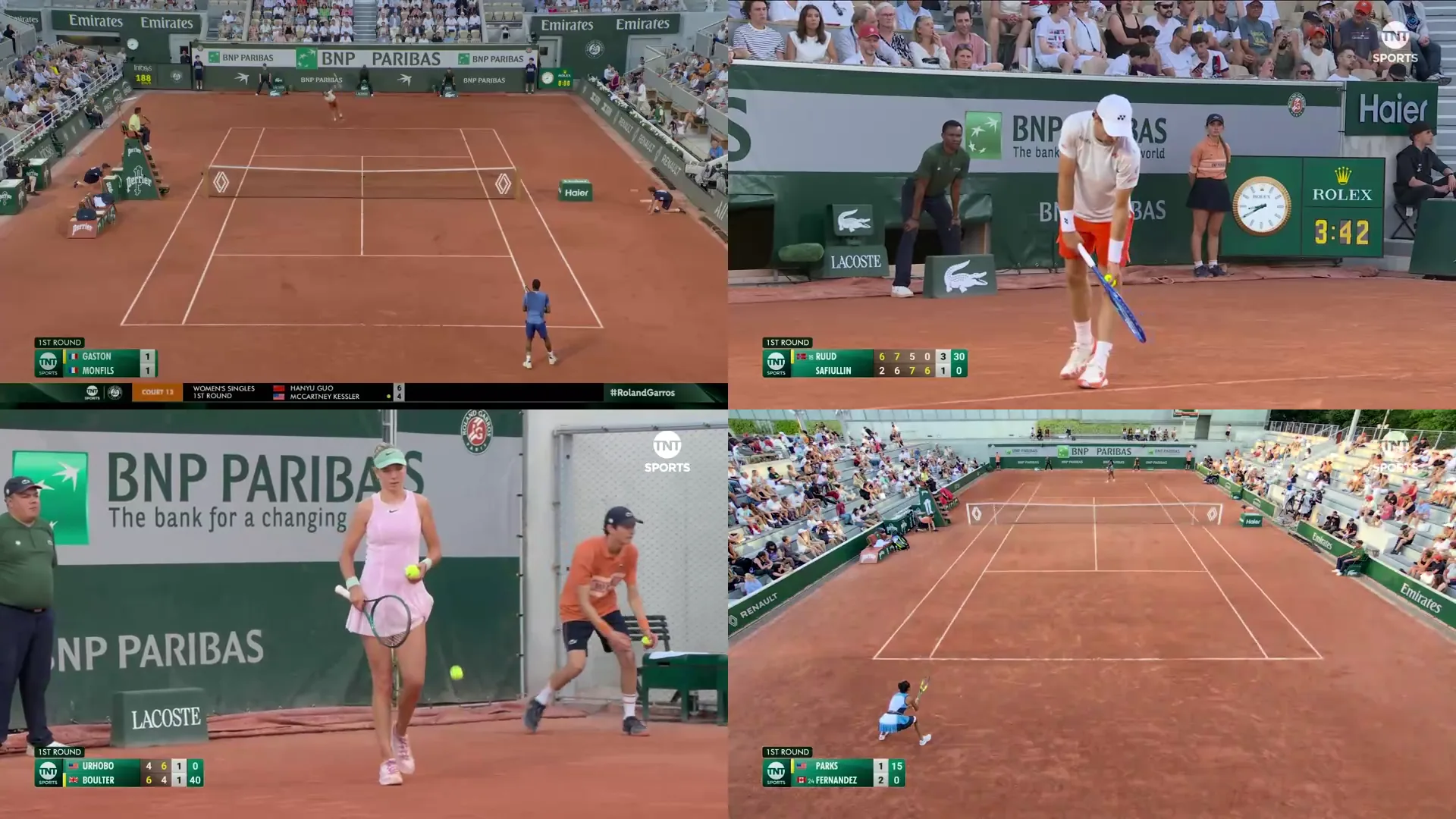
A four box Multiview of four Roland Garros courts, each with its score graphic
Roland GarrosFour box across four courts, each with its own score
A three box Multiview of UEFA Champions League matches
UEFA Champions LeagueThree box, styled for the competition
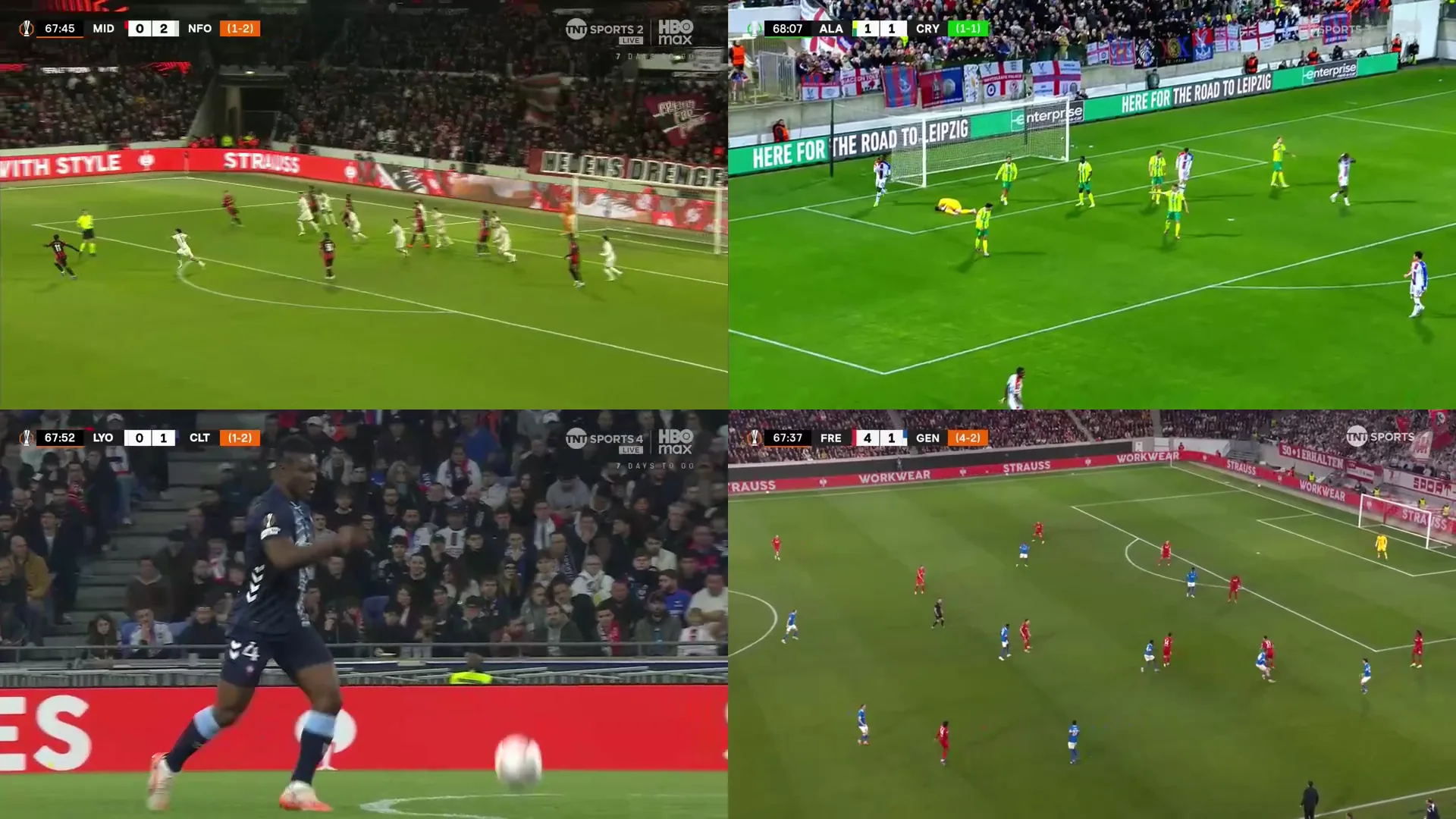
A four box Multiview of UEFA Europa League matches, each with its score graphic
UEFA Europa LeagueFour box, one match in each position

Layouts of different configurations

Four box Equal positions for four sources
One plus three A main source with three alongside
Three box A main source with two alongside
Slated position A slate in one position when needed
Studio

Multiview templates in Studio

Studio is used to create the Multiview templates and to determine which source feeds populate each position within a Multiview. Each template is set up for the event it serves.

  • Layouts of different configurations, arranged to suit the event
  • Source selection, deciding which feed fills each position
  • Slates, with different slates available as needed
  • Design styling, so each Multiview matches the look of the event
The challenge

A Multiview for every kind of event

Skydance covers live events across many sports and competitions, each with its own sources, schedule and presentation. Producing a Multiview for each of them in the conventional way would need its own production setup, with the crew and infrastructure that come with it.

  • Multiview outputs for a wide range of competitions
  • Source feeds with different parameters combined in one output
  • Delivered on the platform already in place, run by one operator
The usual approachOne setup per event

A crew for each event’s Multiview.

Its own production infrastructure.

Feeds with different parameters handled case by case.

Repeated for every competition.

Hard to scaleEach new event adds its own setup and crew.
With MobiiTemplate driven

Source feeds arrive as SRT in Skydance’s cloud.

Fusion brings every source into a common format.

Studio applies the event’s template and logic.

The Multiview returns to Skydance via SRT.

Many events, one operatorOne workflow on the deployment already in place.

What the brief asked for

RequirementWhat it meant
Many eventsMultiview outputs for a wide range of competitions across several sports
Mixed sourcesSource feeds with different parameters combined in a single output
Flexible layoutsLayouts of different configurations to suit each event
SlatesDifferent slates available for use within the Multiview
Event stylingDesign styling applied to match each event
AutomationSwitching between source feeds, and slates, automated where needed
Customer cloudDeployed in Skydance’s AWS environment, receiving and returning every feed there
Small teamA workflow that a single operator can monitor and control
The solution

Multiview production on the existing platform

Three Mobii products, already running for Skydance.

Mobii had already deployed Prism into Skydance’s AWS environment for the NASCAR In-Car Driver Feeds. The Multiview workflow runs on that same architecture, so Skydance added a new capability to infrastructure it already had.

PrismPrismThe architecture in Skydance’s AWS environment
FusionFusionEvery source in a common format
StudioStudioTemplates, layouts, slates and logic
Studio

Logic in the workflow

Logic can be added to the workflow to automate switching between source feeds and to automate slates as needed. Where an event calls for it, the Multiview runs to rules rather than relying on manual changes. Automation handles the repeatable parts of each Multiview, while the operator keeps control of the output.

Workflow needHow it is handled
New eventA Multiview template is set up with the layout and styling for that event
Sources with different parametersFusion brings every source into a common format before processing
Filling each positionStudio determines which source feed populates each position
Switching sourcesLogic in the workflow switches between source feeds automatically
Slate neededSlates are brought in by workflow logic or by the operator
Editorial callThe operator controls the workflow and steps in as needed

What each product does

PrismPrism

The architecture

Deployed in Skydance’s AWS environment.

  • First deployed for the NASCAR In-Car Driver Feeds
  • The same architecture now carries the Multiview workflow
FusionFusion

Every source in a common format

On Amazon EC2 instances in the environment Skydance controls.

  • Received every source feed as SRT from AWS Elemental MediaConnect
  • Brought sources with different parameters into a common format
StudioStudio

Templates and logic

Where each event’s Multiview is defined and run.

  • Created the Multiview templates for each event
  • Determined the source for each position
  • Applied layouts, slates and design styling
  • Ran the workflow logic for source switching and slates
How it ran

One operator per workflow

Because Studio templates and workflow logic carry the production, a single operator can monitor and control the Multiview workflow. The finished output returns to AWS Elemental MediaConnect via SRT, inside Skydance’s cloud, ready for onward distribution.

1Operator per workflow
1Shared deployment

For engineering teams

AreaDetail
InfrastructureMobii Prism architecture deployed in Skydance’s AWS environment, shared with the NASCAR In-Car Driver Feeds workflow
ComputeFusion on Amazon EC2 instances in the AWS environment controlled by Skydance
IngestSource feeds received as SRT from AWS Elemental MediaConnect
NormalizationFusion converts sources with differing parameters into a common format for processing
TemplatesStudio Multiview templates defining layout configuration, source mapping for each position, slates and design styling
AutomationWorkflow logic for automated source switching and slate automation
OutputsMultiview outputs returned as SRT to AWS Elemental MediaConnect
OperationsA single operator monitoring and controlling the Multiview workflow
The outcome

What changed

Skydance gained a Multiview capability for live events across a wide range of sports, built on the deployment already in place for NASCAR, with every feed staying in its own cloud.

OutcomeWhat changed
More from the same platformMultiview runs on the Prism deployment already in place for NASCAR
A template for each eventLayouts, slates and styling are set up for each event in Studio
Any source, one workflowSources with different parameters are combined in the same Multiview
Automation where it helpsSource switching and slates can run on workflow logic
One operatorA single operator monitors and controls the Multiview workflow
Stays in the customer cloudEvery feed is received from and returned to Skydance’s AWS environment
The result

One deployment, many events

Mobii gave Skydance a Multiview capability for live events across a wide range of sports, built on the deployment already in place for NASCAR.

Each event gets its own template, layout and styling, while the underlying workflow stays the same. Mobii. Video, data and intelligence, working as one.