




FusionFusion

One engine. Any cloud, any edge, any venue.

Fusion is the engine that carries out the work for every Mobii product. Studio decides what goes to air and Fusion produces it, Moments selects the clips and Fusion encodes and publishes them, Review asks for the angles and Fusion delivers them in sync. The same engine runs on virtual machines in any cloud, at the edge and on premise.

ANY CLOUDVirtual machinesFusionIngestSynchronizeAI modelsGraphicsSwitch and composeEncodeEDGEEdge clustersFusionIngestSynchronizeAI modelsGraphicsSwitch and composeEncodeON PREMISEZenith and serversFusionIngestSynchronizeAI modelsGraphicsSwitch and composeEncodeOne master clock · Microblock between every instanceOUTPUTS, IN STEPProgramVertical 9:16LocalizedKey and fillHLS · DASH · SRTOne build, any footprint. Where it runs is a configuration choice.
At a glance

One engine, every step

Ingest, AI, graphics, encoding and delivery in one instance, with no copies between them.

Runs anywhere

Virtual machines in any cloud, Zenith encoders at the edge and on premises, the same engine on each.

Your products decide, Fusion does the work

Studio sets the logic, Fusion carries it out, publishes Moments output and feeds Review.

AI that reads the picture

Fusion CV models detect players, cars and objects on the exact frame.

Every format and language

Vertical, multiview and localized outputs from one source, with translated captions and AI voice.

A fleet, not a set of boxes

Zenith encoders configured, monitored and updated remotely as one fleet.

How it works with the products

Your products decide. Fusion does the work.

Studio, Code, Moments and Review are where your teams set the logic and make the choices. Each one sends its instructions to Fusion, which carries them out on the live video, on the exact frame.

The productSends an instructionFusion carries it out
StudioStudioCreates the logic
When car 12 leads, cut to its onboard and show the gap graphic
Switches, composes and rendersCuts cameras, builds layouts and places data driven graphics on the exact frame, on every output.
CodeCodeAsks for data from the picture
Detect every car and driver on all onboard feeds
Runs the AI modelsRuns Fusion CV models on the video and returns every detection to Code, on the same clock.
MomentsMomentsSelects the clips
Publish the lead change as a 9:16 clip with captions
Encodes and publishesFrames the vertical clip with AI, encodes it and publishes it, on an idle encoder or in the cloud.
ReviewReviewRequests the angles
Incident at 14:02:31, every angle with timing data
Delivers synchronized feedsSends every camera angle in sync with the data, to every Review client at the venue or online.
Runs anywhere

The same engine on every footprint

One build, deployed wherever the event needs it. Moving a workflow from the venue to the cloud, or splitting it across both, is a configuration choice rather than a new project.

CLOUD

Virtual machines in any cloud

Fusion enabled virtual machines that scale with demand, in any public cloud region.

  • Hosted for you on Mobii’s infrastructure
  • Or, with Enterprise, in your own cloud
  • Several clouds in the same event
EDGE

Machines at the edge

Fusion close to contribution and to audiences, for low latency processing and localized outputs.

  • Edge clusters in the regions you choose
  • Encoders deployed near the event
  • Linked to the rest by Microblock
ON PREMISE

Zenith and your own servers

Fusion on Mobii’s Zenith encoders, or on your own servers and GPUs inside your facility or network.

  • Venues, trucks, flypacks and stadiums
  • Keeps producing with no connection
  • Baseband or IP facilities
HYBRID

All of them, as one

Venue, edge and cloud instances join one production plane, on one master clock.

  • Main program at the venue
  • Extra outputs in the cloud
  • Managed from one place

Wherever it runs, every machine connects out to the Mobii platform, so networks need no inbound openings, configuration is kept locally, and updates arrive remotely.

The problem

Production chains have too many parts

Most live production chains are assembled from separate products for receiving feeds, graphics, analysis, switching and encoding, often from different vendors.

Every hand off adds risk

Each product has its own timing and its own failure points. Every connection between them adds delay and another thing that can go wrong.

One box per channel

Adding a feed often means adding equipment, so costs rise in step with every output.

Venue and cloud do not mix

Equipment at the venue and services in the cloud rarely work as one, which makes hybrid production complicated.

AI bolted on from outside

AI services from third parties add delay, send content outside your pipeline and can change without warning.

What it does

Everything in one engine

Fusion runs every stage of live production in one engine, on one timeline. That is what lets automation act on live output at the right moment, and what lets one encoder carry many feeds.

Multi feed input

Many camera feeds and data sources on one encoder, from baseband or IP, with Camera Sync bringing delayed cameras back into step.

Perceptive AI

Mobii’s AI detects what is happening in the pictures and turns speech into data, inside your pipeline.

Audio and languages

Captions, translation and AI voiced commentary, keeping the crowd atmosphere and in sync with the picture.

Graphics engine

Mobii’s own graphics engine, with data driven templates placed on the right frame.

Switching and layouts

Multiviews, split screens and player focused layouts, changed live by rules or by your operators.

Any agent, any job

Every Fusion agent can ingest, run AI, render graphics, switch and encode. No separate instance for each task, and many feeds share one encoder instead of one box per channel.

OutcomeWhat changes
More outputs from the same feedsOne set of feeds drives the main program, vertical, localized and alternative outputs at the same time
Lower cost per feedMany feeds share one encoder instead of one box per channel
Automation you can put on airCuts, layouts, replays and graphics land on the exact frame
Fits what you haveWorks with existing broadcast equipment and delivers standard formats, so nothing upstream or downstream has to change
AI that stays in your pipelineMobii’s AI runs inside Fusion, so content stays in your control and responses are immediate
How it works

From feed to finished output

Inside Fusion, video, audio, captions and data travel together as one synchronized stream, from the moment they arrive to the moment they leave.

01

Receive

Camera feeds and live data arrive at the encoder.

02

Synchronize

Every source is lined up on one timeline, and kept that way.

03

Understand

Mobii’s AI reads the pictures and the commentary.

04

Produce

Switching, layouts, graphics and audio, on the right frame.

05

Deliver

Finished outputs to broadcast, streaming and social.

One event, two places. The main broadcast is produced on a Zenith encoder at the venue and delivered straight into the production chain. At the same time, the same feeds go to the cloud, where Fusion produces a vertical feed for mobile and a localized feed in another language. Every output stays in step with every other.

See it working

Fusion in use

What Fusion CV models see, and what Fusion builds from the same sources.

Now showing

What the Fusion CV model sees

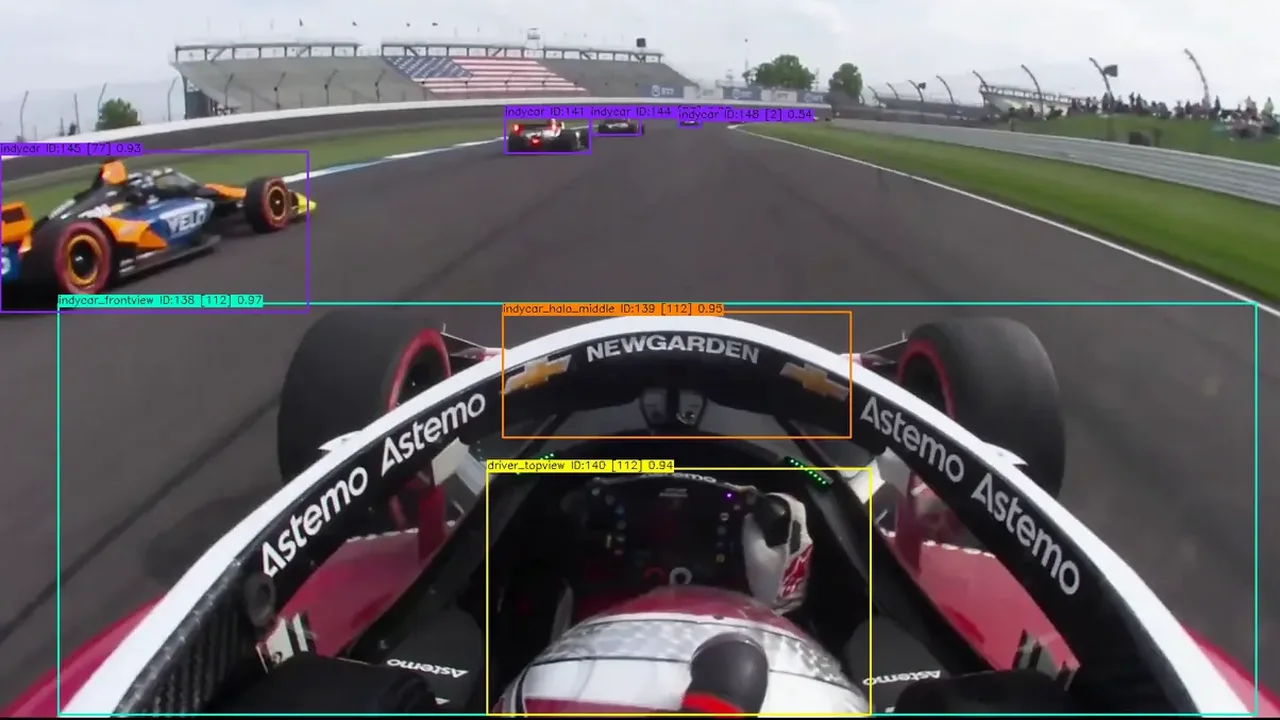
What the Fusion CV model detects in IndyCar onboard video.

Inside Fusion

Sync, AI, languages and layouts

The capabilities of several production systems, running together on every encoder.

Camera Sync

In sync at every step

Cameras, data feeds and commentary all arrive with different delays, and every processing step adds its own. Fusion keeps every source aligned at every stage, and Camera Sync brings delayed cameras, such as wireless cameras, back into step with the rest.

  • Every feed, signal and output kept in step at every stage
  • Delayed cameras measured and corrected automatically
  • Graphics, replays and translated commentary land on the right frame
AS THE SOURCES ARRIVEEach with its own delayCamera 1Wireless camera+6 framesTiming dataCommentary+3 framesFusion measures the offset and corrects itAFTER FUSIONEvery source on the same frameCamera 1Wireless cameraTiming dataCommentary
Perceptive AI

AI that understands the picture

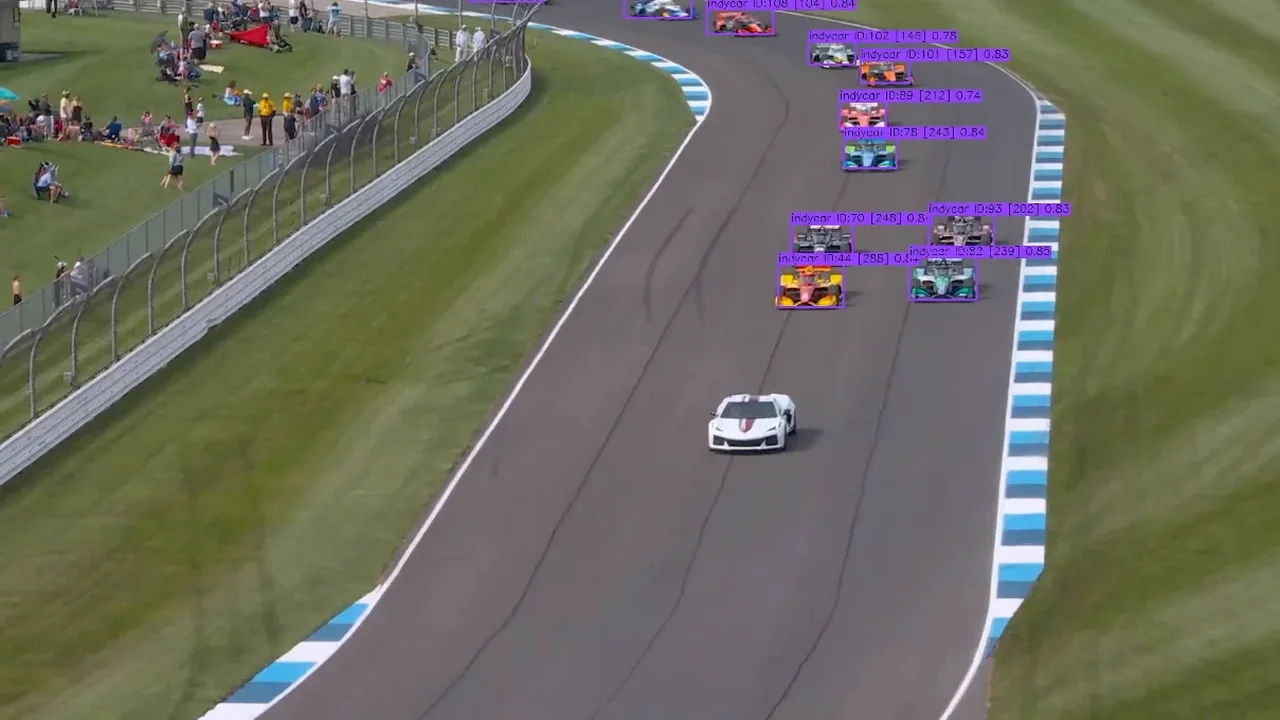
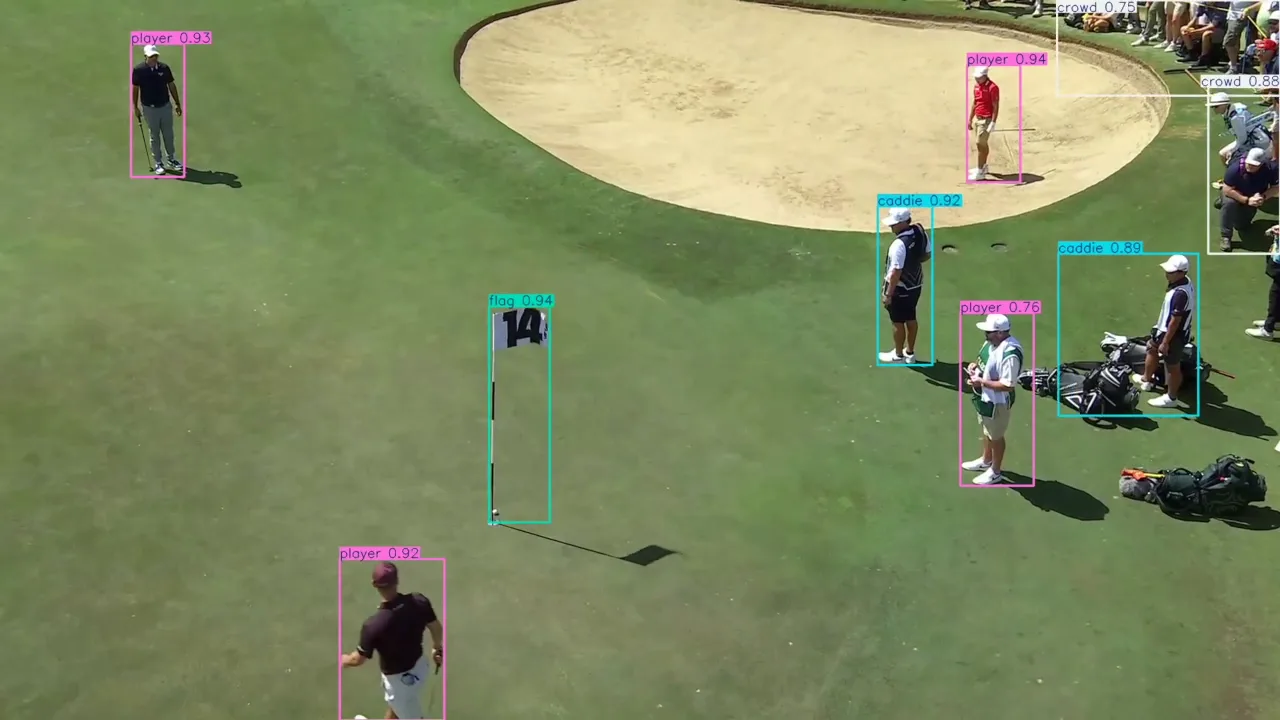
Mobii’s AI runs inside Fusion, on the same hardware as the video. It detects cars, players, objects and poses as they happen, turns speech into data, and sends every detection to Code beside your other data.

  • Players, cars, objects and poses detected from video
  • Speech turned into data as it is spoken
  • Content stays in your pipeline, with immediate responses
  • Detections drive Studio automation and Moments framing
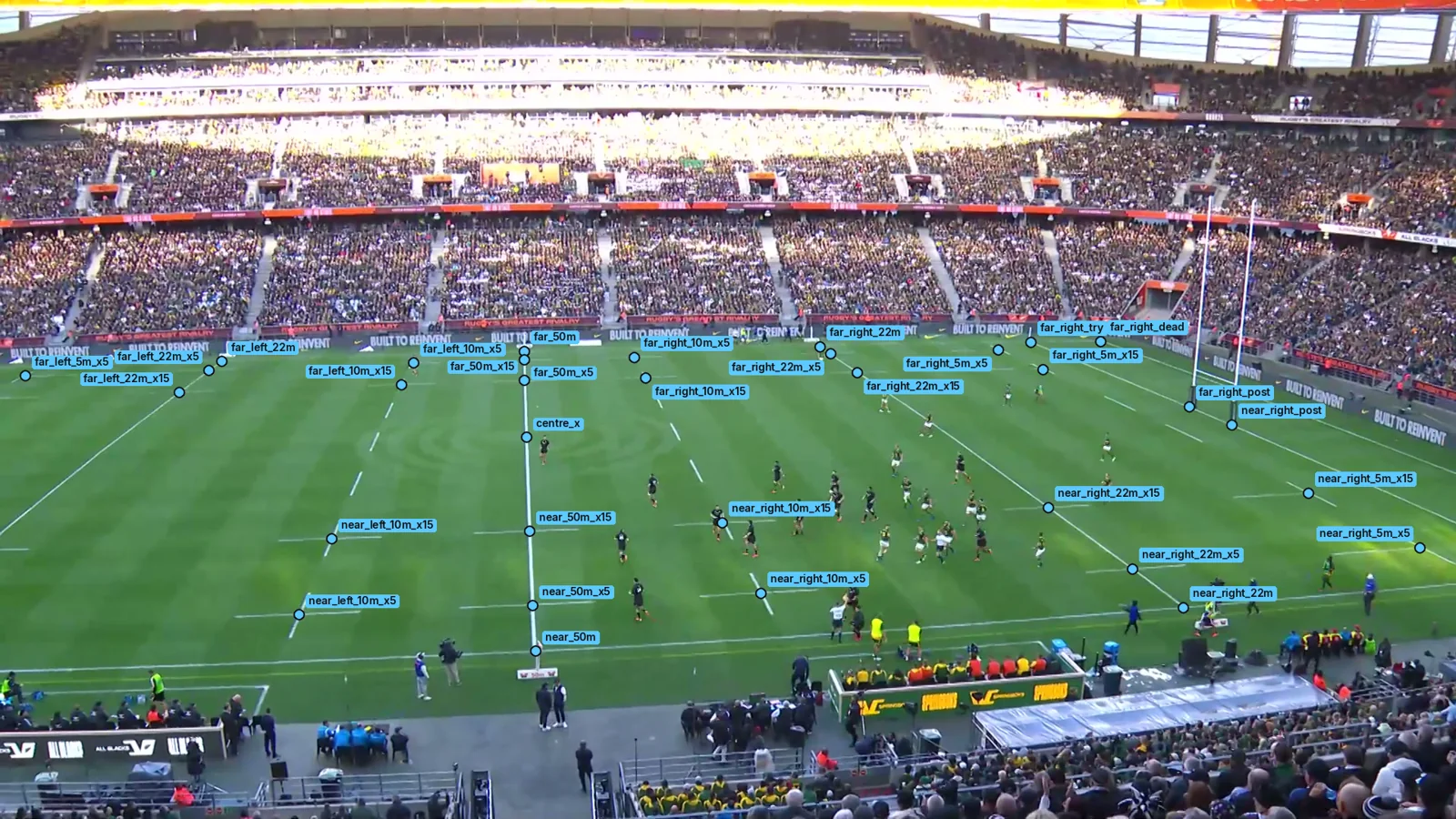
Fusion CV model on a rugby test, locating and naming every line and post on the pitch
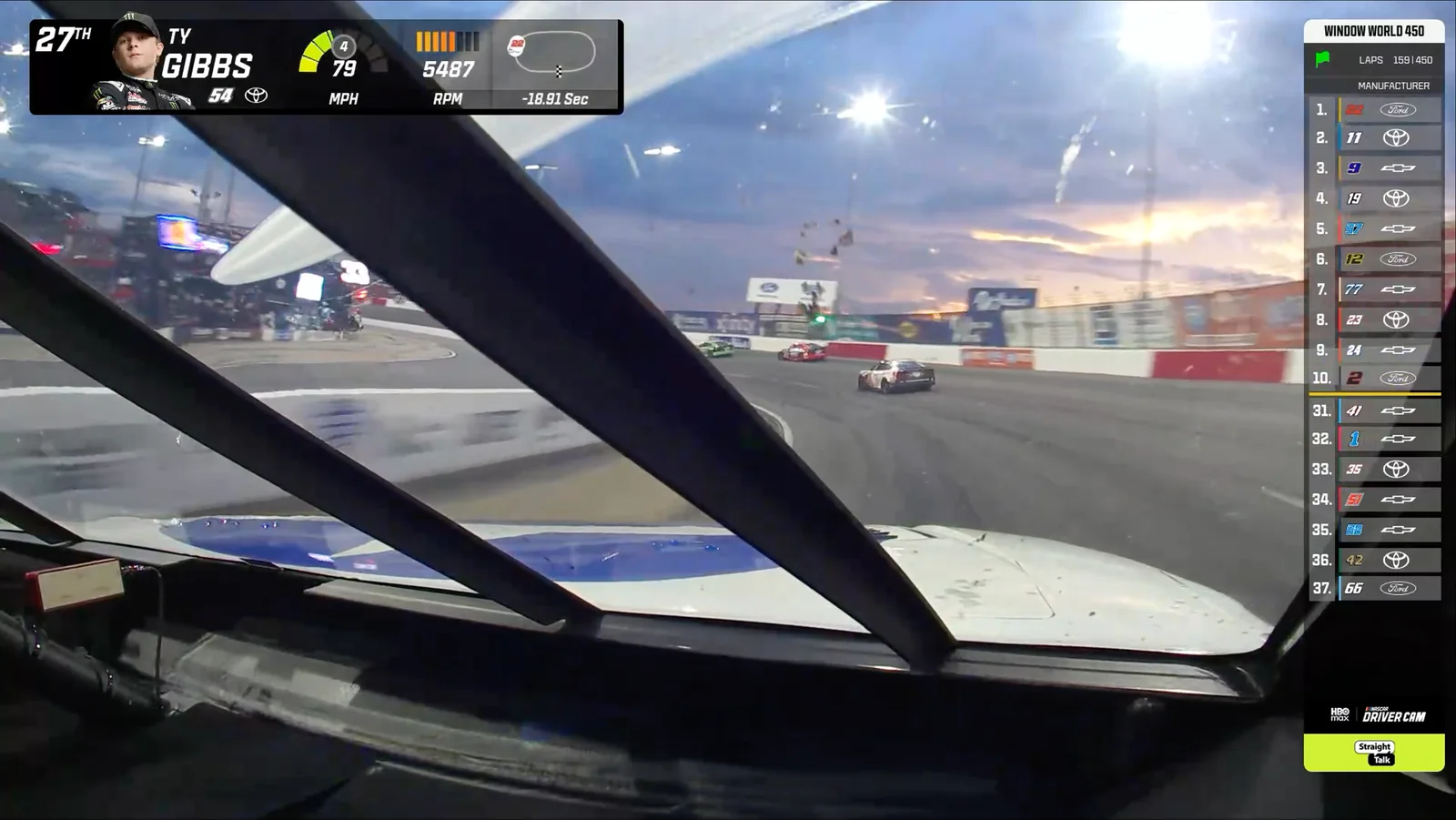
Fusion CV detection on an IndyCar onboard camera, labeling the car ahead, the driver and the cockpit
Fusion CV detection tracking every IndyCar on track
Fusion CV detection on a golf hole, labeling each player and caddie
Audio and languages

One feed, every language

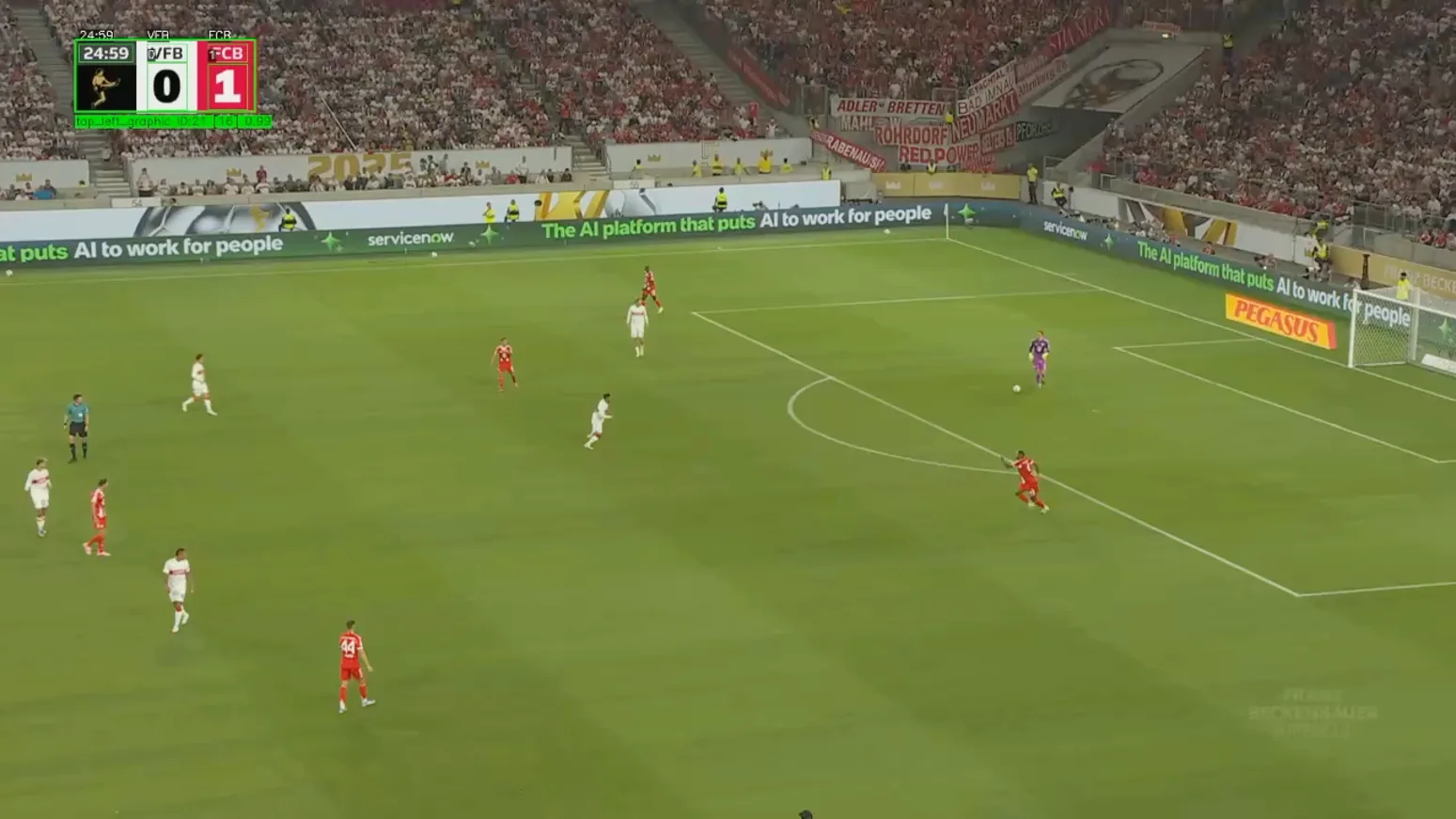
Commentary is captioned, translated and voiced in other languages, keeping the crowd atmosphere and staying in sync with the picture. Broadcast graphics detected in the source can be rebuilt in each language.

  • Captions and translated captions
  • AI voiced commentary that keeps the crowd sound
  • Localized graphics triggered from detection in the source feed
A localized football feed with graphics rebuilt for another market
Switching and layouts

Multiviews and layouts, changed live

Cameras are switched and arranged into multiviews, split screens and player focused layouts, by Studio rules or by your operators. Mobii’s own graphics engine places data driven templates on the right frame.

  • Multiviews, split screens and player focused layouts
  • Switched by rules or by operators
  • Many outputs at once, in the formats your partners already use
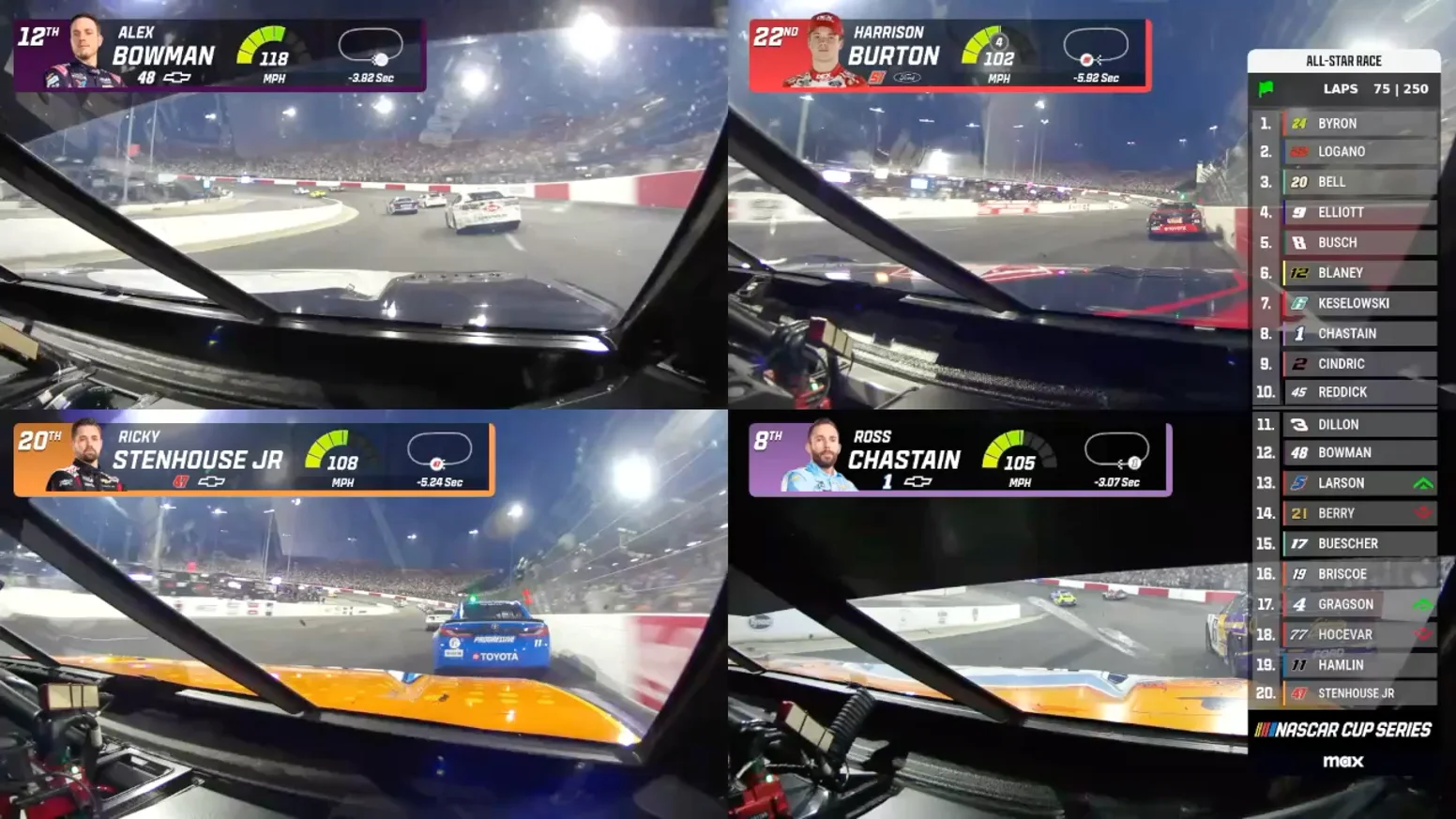
A NASCAR multiview composition produced by Fusion
How it connects

The engine behind every product

Every Mobii product sends its work to Fusion, and Prism connects every Fusion instance into one platform. Adding a product adds capabilities to the engine you already run, not new infrastructure.

FusionFusionThe engine

Processing for every product.

StudioStudioStudio

Cuts, graphics and outputs.

CodeCodeCode

Automated capture.

MomentsMomentsMoments

Exports.

ReviewReviewReview

Synchronized angles.

ZenithZenith

Zenith: Mobii’s encoder for the venue

Zenith is Mobii’s rackmount encoder, configured for your workflow and your broadcast equipment. It runs Fusion with production teams, in trucks and facilities, or installed permanently in stadiums. The main broadcast can be produced on Zenith at the venue while the same feeds go to the cloud for vertical and localized outputs, all in step.

  • Configured for baseband or IP facilities, so nothing upstream or downstream has to change
  • Keeps producing at the venue without a connection, and reconnects to the cloud automatically
  • Connects out to the Mobii platform, so venue networks need no special changes and updates arrive remotely
  • Exports highlights and clips between events, so the equipment stays busy and cloud costs fall
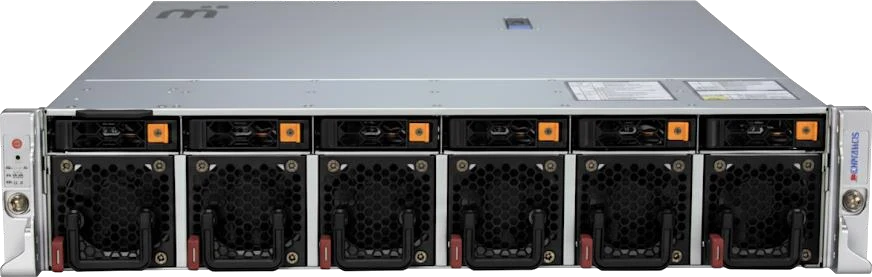
Front of a Zenith encoder, a 2U rackmount unit with hot swap drive bays and fans
Every machine works

A fleet, not a set of boxes

Every Fusion instance, physical or virtual, is also an agent. Work such as highlight exports and AI processing is shared across the fleet, so expensive GPUs stay busy rather than idle.

Live comes first

An encoder covering a live event is never given other work.

Busy between events

Idle encoders take exports for Moments, clips from Review and AI processing.

Overflow to the cloud

When every physical encoder is busy, work moves to cloud virtual machines automatically.

Pools by team

Capacity split by team or priority, with extra capacity added at peak times.

OutputWhat Fusion delivers
StreamingHLS, DASH and MPEG-TS, with SCTE-35 signaling carried through
BroadcastSRT and baseband or IP outputs into your facility and partners
Facility graphicsKey and fill, with alpha on a second leg, for trucks and galleries
CaptionsCEA-608 and 708 preserved end to end
LanguagesAn extra audio track for each localized language
PlayersSynchronized output plays on standard players, with nothing to install
Deployment

Choose the footprint for each event

Every Fusion instance, physical or virtual, is managed from the same place, and you can mix footprints within one event.

OptionHow it worksSuited to
On premiseZenith encoders, or your own servers and GPUs, at the venue, in a truck or in your facilityVenue production, permanent installations, offline workflows
Mobii cloudMobii hosts Fusion virtual machines for youStarting quickly, with no cloud infrastructure of your own
At the edgeFusion in edge clusters close to the event or the audienceLow latency processing and localized outputs per market
Your own cloudWith Enterprise, the platform runs inside your cloud environmentOrganizations with cloud commitments, residency or security needs
HybridOn premise, edge and cloud instances on one timelineA main program at the venue, extra outputs in the cloud

Managed from anywhere

Run and monitor every venue and cloud workflow remotely. New features and updates arrive without an engineer on site.

Keeps producing offline

A Zenith encoder keeps producing at the venue without a connection, and reconnects to the cloud automatically.

Busy between events

When an encoder is not covering a live event, it exports highlights for Moments and clips from Review.

How it is provided

Fusion Core on every encoder

Every encoder, whether a Zenith encoder or a cloud virtual machine, carries a Fusion Core license. Studio, Code, Moments and Review add the capabilities each encoder needs for your workflow.

Included with Fusion CoreWhat it covers
Feeds and outputsVideo inputs and outputs, limited only by the capacity of the encoder
Standard output formatsThe formats your broadcast, streaming and production partners already use
MonitoringEncoder performance and feed health, visible centrally
Remote managementConfiguration, control and updates through the Mobii platform
UpdatesNew features, updates and improvements as they are released
Camera SyncCorrection for cameras that arrive later than the rest

Encoder options: Zenith encoders for venues, trucks, facilities and permanent stadium installations, cloud virtual machines monthly for a season or a peak period, or reserved annually for year round production. Your Mobii team sizes the encoders and the mix of venue and cloud with you. Talk to us about pricing.

Who it is for

Built for broadcast and beyond

From a single venue to many markets, Fusion adds outputs without adding equipment.

OrganizationTypical challenge, and what Fusion delivers
BroadcastersAdding outputs without adding equipment and complexity. Fusion gives them more outputs from the same feeds, fitting existing equipment
Production companiesFlexible production at the venue and in the cloud. One engine for trucks, facilities and cloud, managed remotely
Leagues and venuesInfrastructure that serves review, analysis and production. Encoders installed at the venue that serve every Mobii product
Rights holdersProducing for more platforms and markets. Vertical, localized and alternative outputs from one source
FAQ

Questions about Fusion

Something else you want to know? Talk to us.

How does Fusion work with the products?

Your products decide and Fusion does the work. Studio sets the logic and tells Fusion what to do, Fusion encodes and publishes the output from Moments, and delivers synchronized feeds to Review.

Do we buy Fusion separately?

Fusion is the engine Studio, Code, Moments and Review run on. Every encoder carries a Fusion Core license, and the products you choose add the capabilities you need.

Will it work with our existing broadcast equipment?

Yes. Zenith encoders are configured for baseband or IP facilities, and Fusion delivers standard formats, so nothing upstream or downstream needs to change.

Which clouds does Fusion run on?

Fusion runs on virtual machines in any public cloud region, on Mobii’s infrastructure or, with Enterprise, in your own cloud, and the same event can use more than one.

Can a Zenith encoder work without an internet connection?

Yes. It keeps producing at the venue offline, and reconnects to the cloud automatically when a connection returns.

How many feeds can one encoder carry?

That depends on the encoder configuration and the work each feed needs, such as AI and graphics. Your Mobii team sizes the configuration with you.